


Rubric generator
Describe the assignment and get an analytic rubric with a description in every cell.
GradeWithAI grades any assignment, from essays and handwritten tests to math, short answers, and projects, with feedback for every student. Sync with Canvas, Google Classroom, and Google Forms, or upload work from any LMS.
4.8 out of 5 from 1,283 teacher reviews
21,000+ teachers have graded 2,000,000+ student submissions with GradeWithAI
Including teachers at
Every subject and grade level, from a third-grade spelling quiz to a college lab report. Here are the most common.
Sync assignments and return grades in one click with Canvas, Google Classroom, and Google Forms. On Schoology, Blackboard, Moodle, Brightspace, or Microsoft Teams, upload student work and export grades for any gradebook.
Direct sync
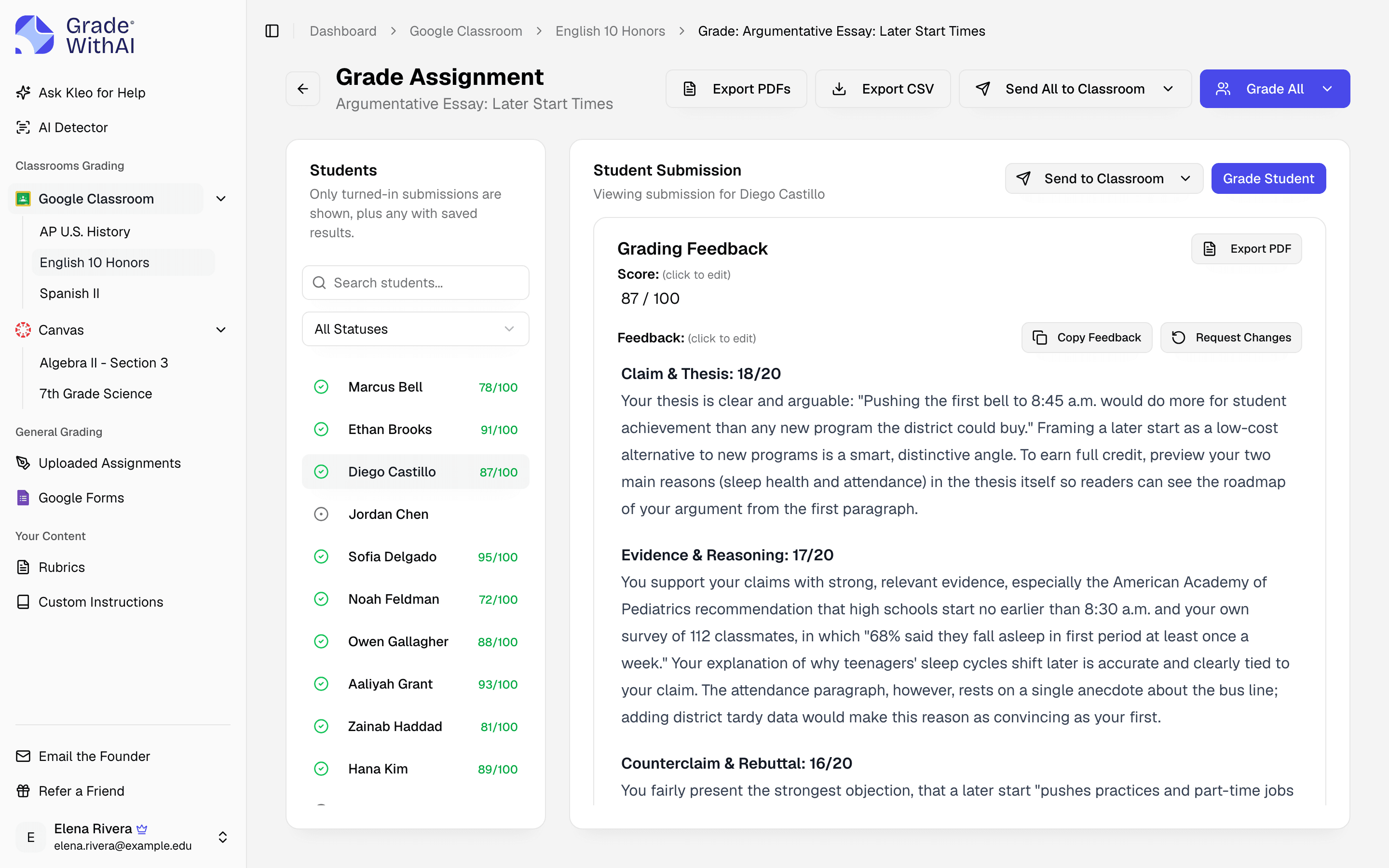
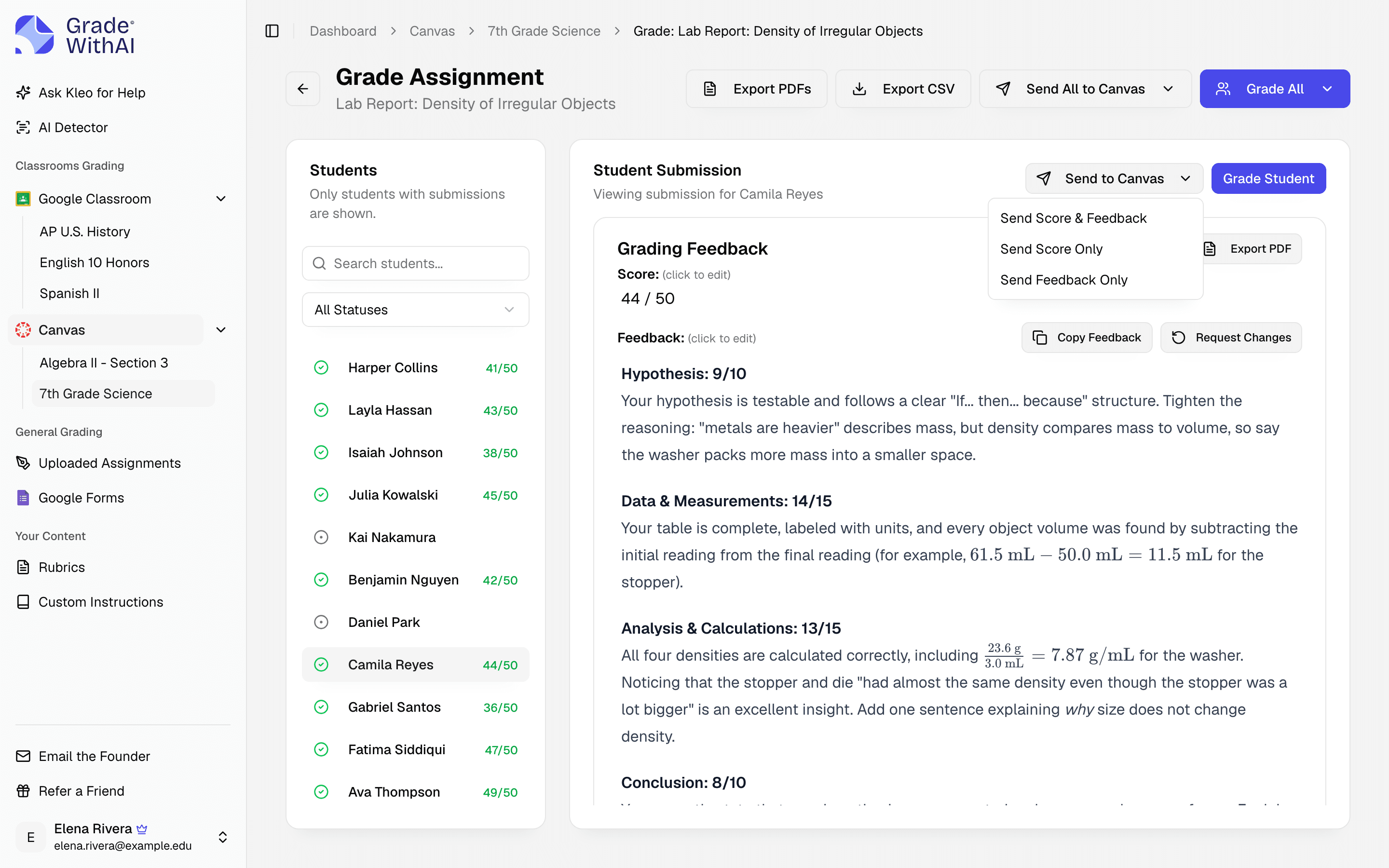
Assignments and responses come straight from Canvas, Google Classroom, and Google Forms, and grades go back to SpeedGrader or Classroom.
Every other LMS
Upload PDFs, docs, or scans from any platform, then export results as a CSV or PDFs.
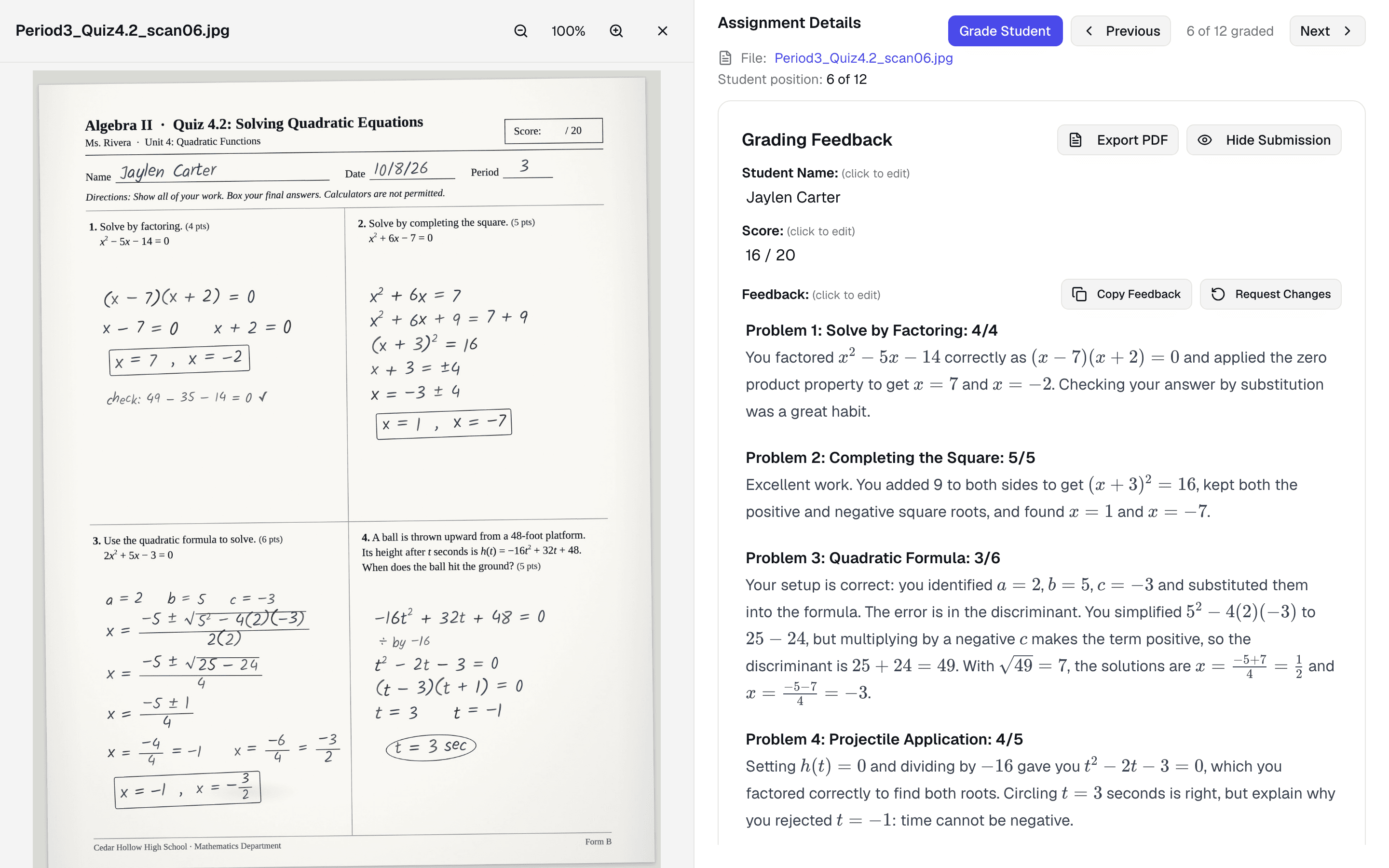
Upload PDFs, Word docs, slides, or photos of paper. GradeWithAI reads handwriting, finds student names, and grades every page.
Handwritten and digital work, in any subject
Student names filled in automatically
Results exported as PDFs or a CSV
Upload a rubric as a PDF or Word file, start from an AP, IB, or general template in the Rubric Library, or generate one from the assignment instructions and edit any cell.
Try the free rubric generator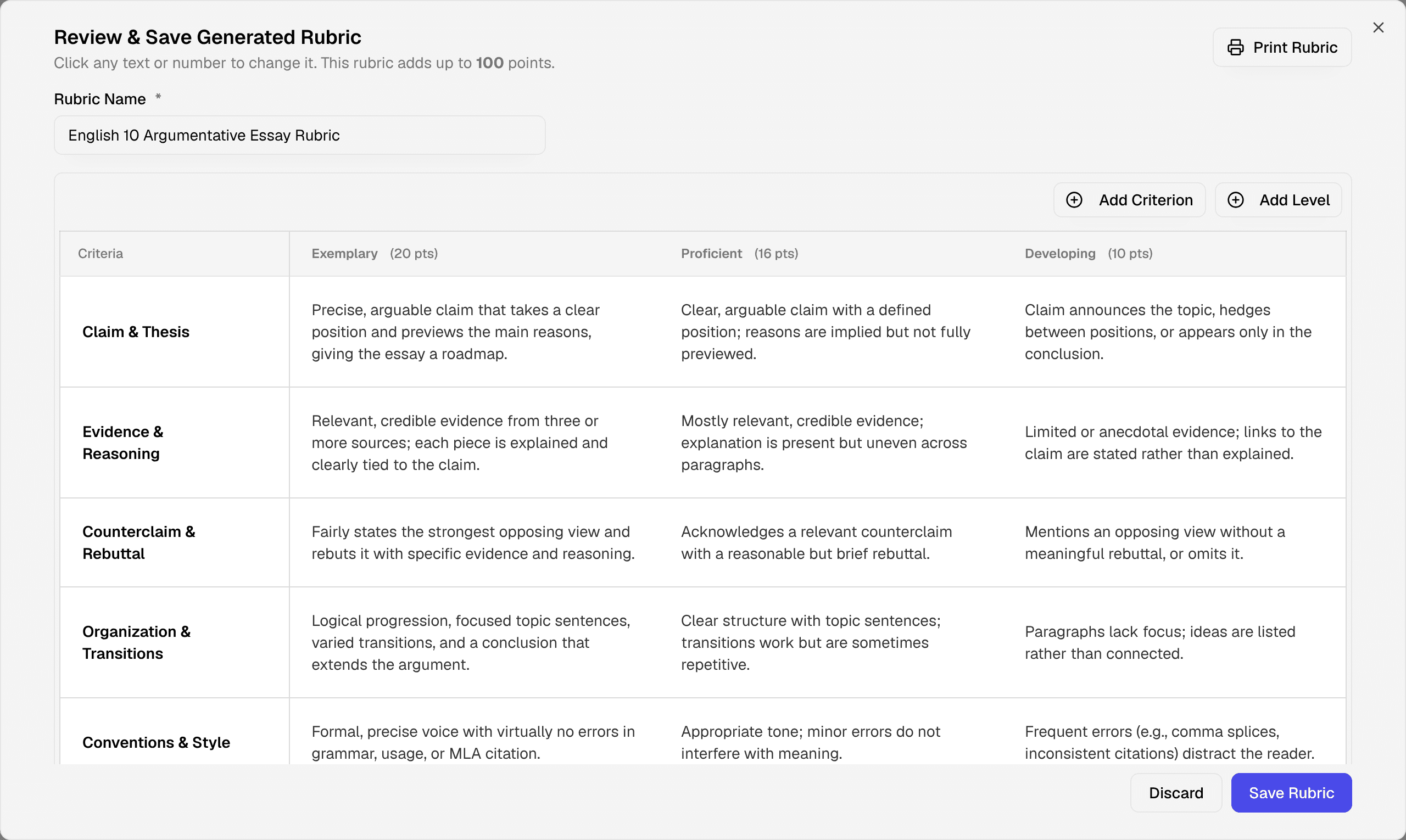
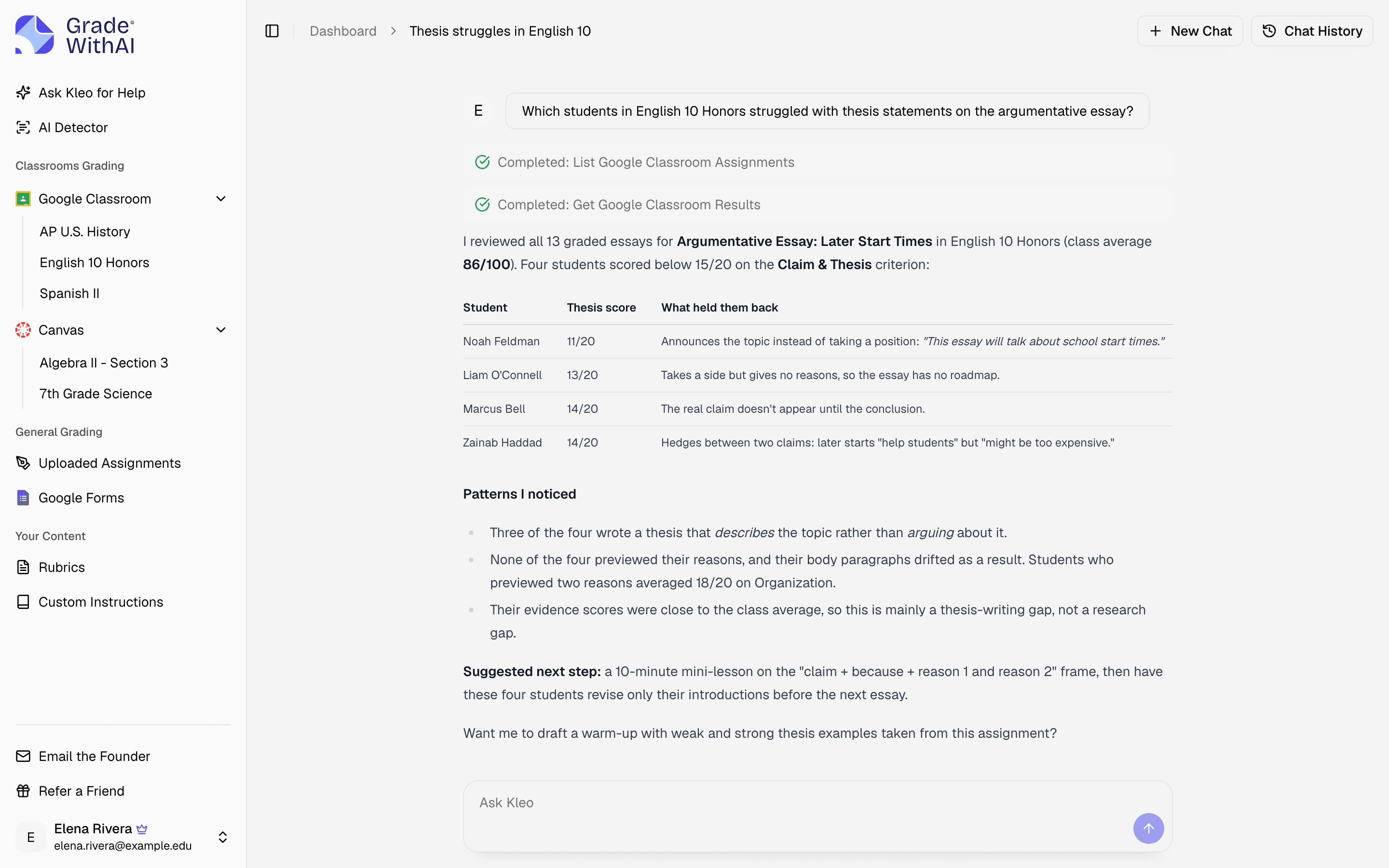
Kleo knows your students, assignments, and rubrics, so it can point out learning gaps, draft parent emails, and suggest next steps.
You review every score before students see it, unless you turn on Google Classroom auto-grading.
Connect Canvas, Google Classroom, or Google Forms, or upload PDFs, Word files, slides, and phone photos from any other LMS.
Upload yours, start from a template, or generate one from the assignment instructions. Add notes such as “ignore spelling” if you need them.
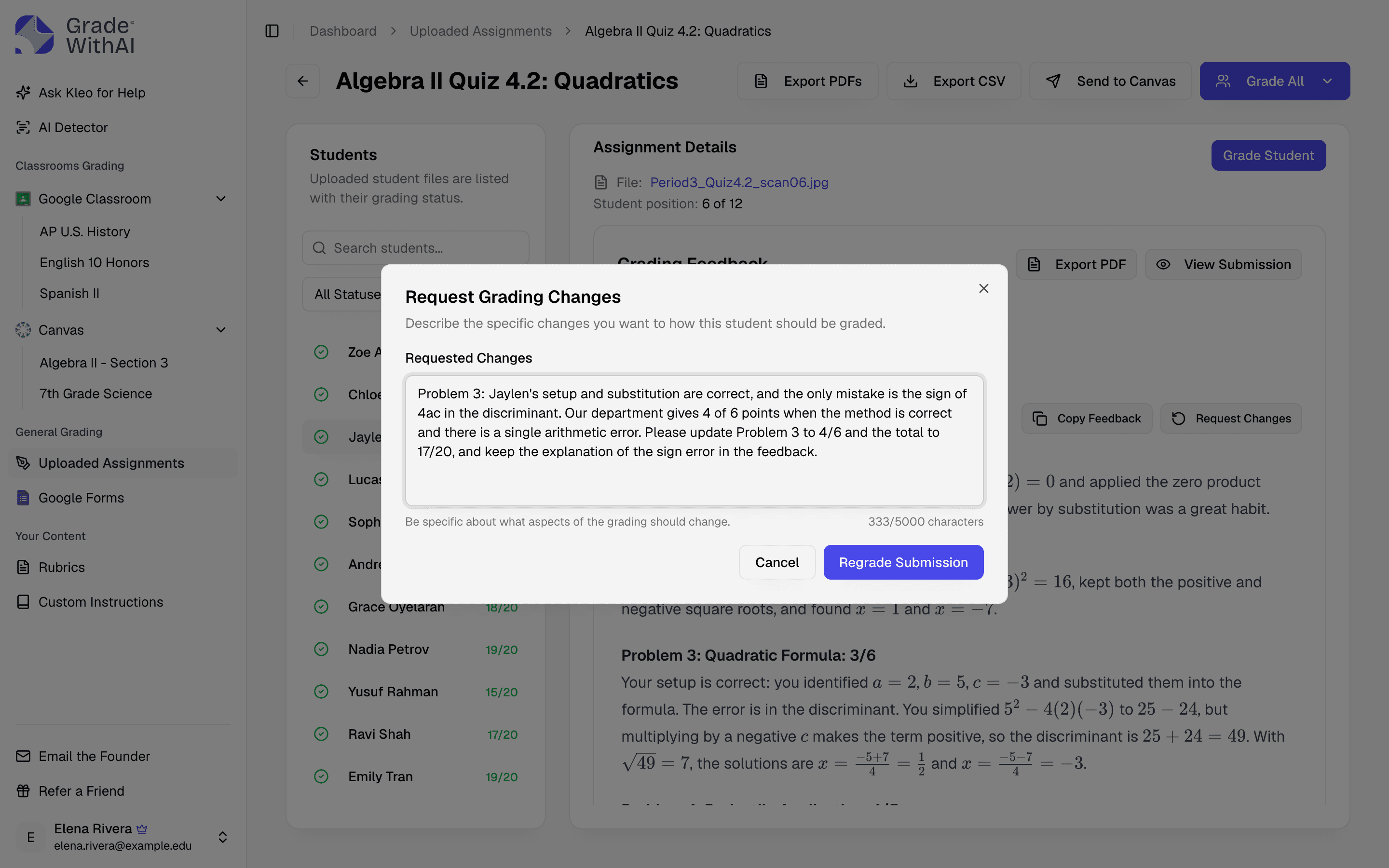
Each submission gets a score and a comment for every criterion. Edit anything, or ask for a regrade with a note.
Send scores and feedback to Canvas or Google Classroom, or export a CSV and per-student PDFs.
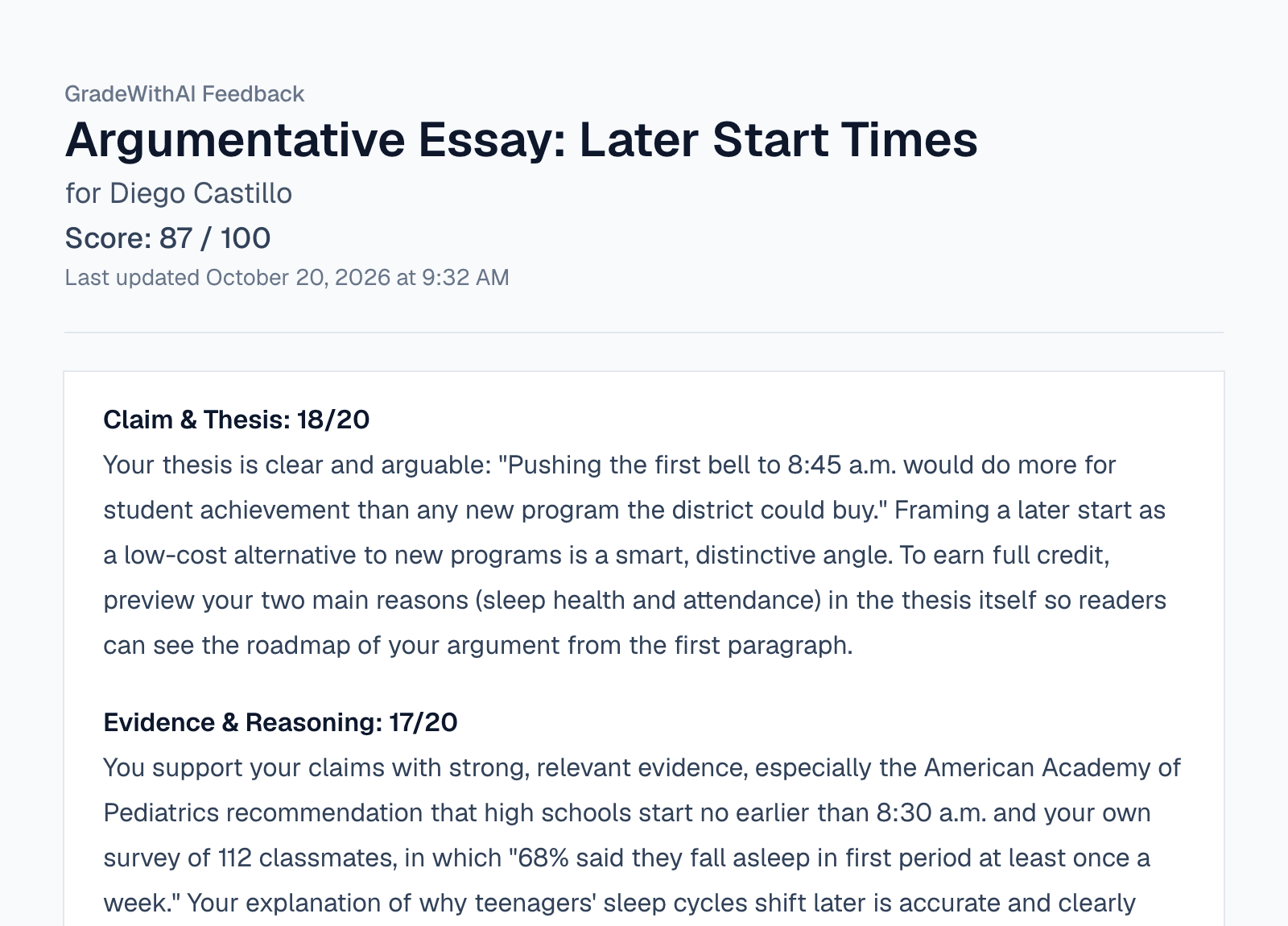
A score for each part or criterion, with a comment that quotes their work and says what to fix.
Teachers across subjects, from AP history to astrophysics, on grading with GradeWithAI.
“I've really enjoyed using the GradeWithAI program. It saves me a ton of time, especially when I have class sizes of 35 or 36 students times five.”

“GradeWithAI doesn't just grade. It gives the student reasoning as to why every point is awarded or not awarded. That is a very valuable thing for the students.”

“More impressive though is that it corrects student answers not simply using a pre-written answer, but by following the thought process they've pursued.”

“For Chadwick users, GradeWithAI has improved feedback efficiency and effectiveness, as it is grounded in existing platforms and is highly adaptable.”

“GradeWithAI [provides] students with timely individualized feedback on their homework assignments and formative assessments. This is a job that is virtually impossible for a teacher to do on a regular basis.”

“Students have also appreciated the consistency and immediacy of the feedback I can provide through GradeWithAI. This has enabled them to make necessary corrections and achieve their desired scores on any assignment.”

The free plan grades 25 submissions every 30 days. Pro is $20 a month, or $120 a year, for unlimited grading.
See pricing detailsFor trying GradeWithAI on a few assignments
For teachers who grade every week
or $120/year
Custom pricing for a school or district.
Student work is encrypted in transit (TLS 1.2+) and at rest (AES-256), processed only to grade it, and never used to train AI models.
Rubrics, quizzes, lesson plans, and 13 more tools. No account needed.
Describe the assignment and get an analytic rubric with a description in every cell.
Multiple choice, short answer, and true/false questions with an answer key, from a topic or a pasted passage.
A one-lesson plan with an objective, timed activities, and a check for understanding.
Answers to common questions from teachers and school leaders. Something not covered here? Email john@gradewithai.com.
An AI grader reads student work, scores it, and drafts written feedback for each student. GradeWithAI is an AI grader for teachers that grades essays, handwritten work, math, tests, and projects in any subject, and you review every score first. More than 21,000 teachers have used it to grade over 2,000,000 submissions.
Almost any assignment. Teachers use it for essays, research papers, handwritten tests, math problems with work shown, short answers, DBQs and other AP responses, lab reports, projects, presentations, and Google Forms quizzes, across all subjects and grade levels.
Elementary school through college, in any subject. Teachers use it for 3rd-grade spelling quizzes, middle school science lab reports, high school essays and AP DBQs, and college problem sets.
Yes. GradeWithAI syncs directly with Canvas, Google Classroom, and Google Forms, so you can import assignments and send grades and feedback back in one click. With any other LMS, such as Schoology, Blackboard, Moodle, Brightspace, PowerSchool, or Microsoft Teams, you upload student files to GradeWithAI and return reviewed results yourself or export them as a CSV or PDFs. There is no native sync or automatic grade return for those platforms today, except Schoology sync on Schools & Districts plans.
Yes. GradeWithAI's free plan grades 25 submissions every 30 days and includes Canvas, Google Classroom, and Google Forms sync, handwritten grading, the rubric generator, and the Kleo assistant. Pro is $20 a month or $120 a year for unlimited grading.
It is most consistent on criteria that can be checked against the work, such as whether a thesis is arguable, whether two documents are sourced, or whether each step of a derivative is correct. It is less reliable on faint handwriting and on vague criteria like "sophistication" without level descriptions. Every score is a draft: edit it, or use Request Changes to regrade with a note.
A general chatbot can comment on one piece of writing at a time. GradeWithAI is built for grading a whole class: it grades every submission consistently, reads handwriting and finds student names, syncs with Canvas, Google Classroom, and Google Forms, and keeps a review step before grades are returned. Student work is never used to train AI models.
Either works. Upload a rubric as a PDF or Word file, start from an AP, IB, or general template in the Rubric Library, or generate one from the assignment instructions and edit it.
Click the score or comment and change it, or choose Request Changes, describe the problem ("Part B cites Document C correctly"), and that submission is regraded. Nothing goes to Canvas or Google Classroom until you send it, unless you turn on Classroom auto-grading.
Yes. It reads print, cursive, math notation, and labeled diagrams from phone photos or scans. If the whole class is in one PDF, set the pages per student and GradeWithAI splits the file and reads each name.
Yes. We use encryption in transit and at rest, role-based access controls, and security practices designed for school data handling, including FERPA-aligned workflows.
Google Classroom: sign in with Google and approve access. Canvas: paste your Canvas URL and a personal access token from Account > Settings. Uploads need no setup.
Pro is $20 a month or $120 a year and covers every class you teach. There is no per-student fee. Schools and districts can contact us for a school-wide plan.
District plans include full security documentation, vendor questionnaires, and compliance support to meet procurement requirements. Our team works directly with IT departments to address security reviews and data privacy concerns.
That is your call. Many teachers tell students that AI drafts the first pass and that they review every score. The feedback appears like any comment you leave in Canvas or Google Classroom.
Yes. Pro plans include built-in AI detection that analyzes each submission for AI-generated content. Each submission gets a 0–100% AI score with a matching label (Human Written, Mostly Human, Mostly AI, or AI Generated), shown alongside grading feedback. Photos and scans of handwriting are not checked.
21,000+ teachers have graded 2,000,000+ student submissions with GradeWithAI. The free plan grades 25 submissions every 30 days.
Free plan · No credit card required
Reported by teachers using GradeWithAI, with feedback on every submission they grade.